
OCR in Logistics: From Visible Text to Verified Data
OCR in logistics turns visible text on containers, labels and transport documents into machine-readable data. By combining optical character recognition with Visual AI, teams can capture useful identifiers from images and video, then check and connect those values to a business process.
A container number read at a gate, a shipment reference captured at goods receipt or a quantity extracted from a delivery note can support a more consistent record. The value comes from the full workflow: a usable image, a reliable read, appropriate validation and a clear destination for the data.
How an OCR Workflow Works
An AI-powered OCR workflow usually brings together several tasks:
- Capture: obtain an image or video frame in which the target text is visible.
- Locate: identify the relevant text region, such as a container marking or a label.
- Recognise: convert the characters into text.
- Validate: check the format, expected values and any applicable consistency rules.
- Use: map accepted data to a record and route exceptions for review.
These steps should be evaluated separately. A model may find the right text region but still confuse a character. A correctly read reference may also be attached to the wrong shipment if the surrounding business logic is incomplete.
Container Numbers: A Concrete Logistics Use Case
Container identification is a practical example of OCR in logistics. Cameras at an arrival point can capture the visible identifier so that a configured workflow can compare it with an expected movement or existing record.
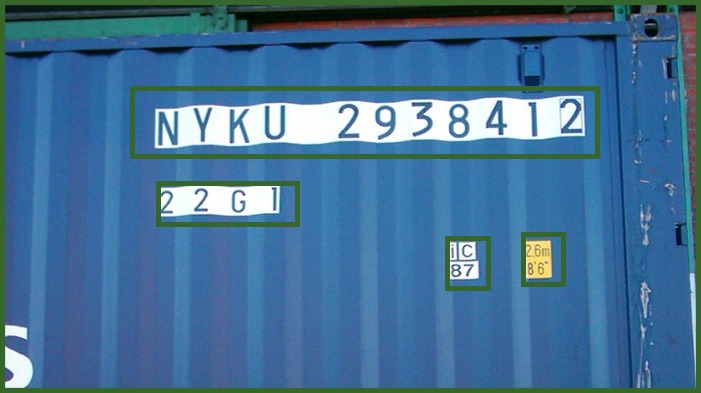
The example above illustrates the first part of this process: text regions on a container have been highlighted. Those rectangles show where text is located; they do not, on their own, establish the accuracy of the extracted characters.
Standard container identifiers include an owner prefix, an equipment category identifier, a serial number and a check digit. The Bureau International des Containers explains how the check digit helps validate the identifier. This check can help flag inconsistent reads, but it does not establish a container’s current contents or authorise a movement.
Reading Labels and Transport Documents
Shipment and Product Labels
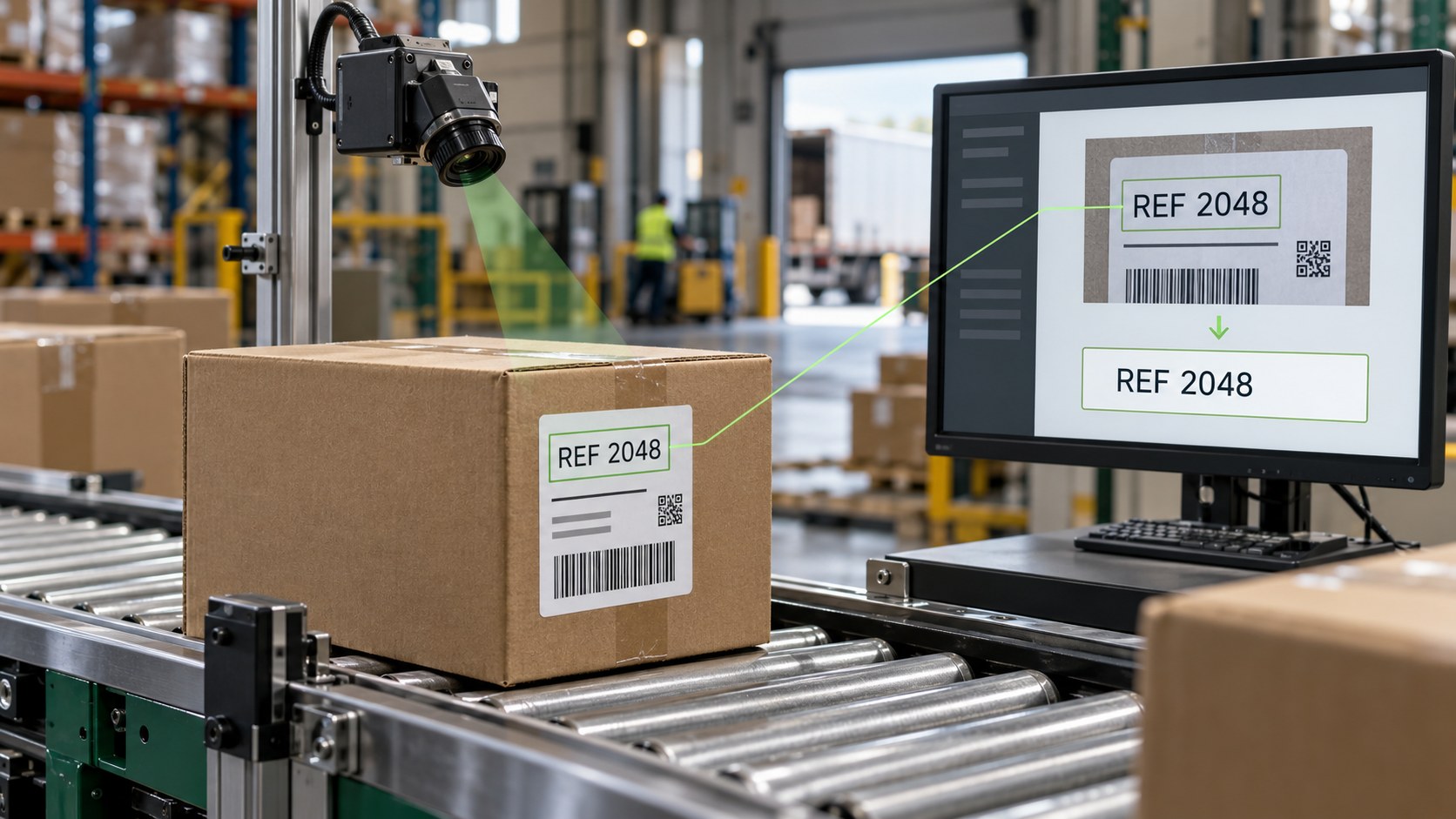
At goods receipt, an OCR workflow could read a shipment reference or product code printed on a label and compare it with an expected delivery. The process must account for different suppliers, layouts, fonts and label positions.
OCR and barcode scanning are different tasks. OCR reads characters; barcode recognition decodes a symbol. Where both are available, a project can assess whether comparing the two results provides a useful consistency check.
Delivery Notes and Transport Documents
For delivery notes or other transport documents, recognising text is only the starting point. The application must identify which text belongs to fields such as a document reference, date or quantity, and associate it with the correct record.
A practical workflow defines the required fields and how to handle missing values, unfamiliar layouts or ambiguous results. Handwritten additions and damaged documents need their own evaluation rather than being treated as routine printed text.
From Recognised Text to WMS and ERP Data
Consider an illustrative arrival workflow: a camera captures a container identifier, software checks its format and check digit, and the result is compared with an expected arrival. An accepted match can then be recorded through an agreed interface; an uncertain read or unexpected identifier goes to an operator.
For integration with a warehouse management system (WMS), transport management system (TMS) or ERP, define the destination fields, matching rules, duplicate handling and acknowledgement of each update. An agreed interface and business rules are needed; text recognition alone does not complete the integration.
Where appropriate, retain a reference to the source image and capture time so that an operator can review the original evidence. Set access permissions and retention according to the information being processed.
Installation: Make the Text Readable
- Character visibility: test text size in the captured image, camera distance, focus and viewing angle. A wide overview may show the object while leaving its text too small to read.
- Lighting and motion: assess glare, shadows, reflections and motion blur across representative operating conditions.
- Layout variation: include the containers, suppliers, label positions and document formats that occur in practice.
- Capture timing: define when a read is needed, how useful frames are selected and how repeated observations are combined.
- Operational response: decide what happens when no reliable value is available or a downstream system rejects an update.
Start with a limited use case and a representative sample. This makes it easier to identify whether the main constraint is image capture, recognition, validation or integration.
Know the Limits and Measure the Right Results
OCR can misread similar characters, miss text hidden by dirt or damage, or produce an incomplete value from a blurred image. A confidence score is a signal for the workflow, not a guarantee that the field is correct.
Measure the performance that matters to the operation:
- Complete-field accuracy: how often the full identifier or required field is correct.
- No-read rate: how often the system cannot return a usable value.
- Incorrect accepted values: how often a wrong value passes the workflow’s checks.
- Review effort and timing: how many exceptions need attention and whether processing meets the task’s time requirements.
Compare outputs with a reviewed reference dataset and test different shifts and conditions. Establish acceptance criteria before wider deployment, then reassess after changes to cameras, layouts or incoming materials.
Discuss an OCR Project with airis:net
airis:net’s logistics solutions include visual identification of container IDs and other vehicle and cargo markings. An OCR project should connect that recognition task to a clearly defined operational need.
Bring representative images or footage, the fields you need, expected layouts and the system that will receive the results. These inputs help scope the recognition, validation, integration and pilot requirements for a tailored solution.
Visual AI can support other logistics tasks too. Explore our article on AI for warehouse safety around forklifts and pedestrians. For data-handling considerations, read about German-hosted AI, data protection and control.
FAQ
What is OCR in logistics?
OCR in logistics converts visible text on containers, labels and transport documents into machine-readable characters. A useful workflow then validates the extracted values and connects them to the relevant business record.
Can OCR read container numbers from camera footage?
It can support this task when the markings are visible and image quality is sufficient. Camera position, lighting, motion and character size must be evaluated using representative footage from the site.
Is OCR the same as barcode scanning?
No. OCR reads printed or displayed characters, while a barcode reader decodes a symbol. They can complement each other, for example by comparing a readable shipment reference with the value encoded in a barcode.
Does OCR automatically integrate with a WMS or ERP?
No. The project must define the destination fields, record-matching rules, validation checks and the interface used to transfer data. Reading a value and updating an operational record are separate steps.
Can OCR read moving or damaged labels?
Performance depends on the image and the extent of the damage. Motion blur, occlusion and missing characters can prevent a reliable read. The workflow should flag uncertain or unreadable values for review.
How should an OCR pilot be evaluated?
Measure complete-field accuracy, no-read cases, incorrect accepted values, manual review effort and processing time under representative conditions. Test the downstream validation and exception workflow as well as the text recognition.